Is Asana the Problem or Are You Using It Wrong? A Guide to Optimizing Asana Workflows
When I get an SOS that an Asana workflow or setup has turned into a chaotic nightmare, 99% of the time it's NOT because Asana sucks. It's because of unexamined workflows, inconsistent conventions, or haphazard adoption.
Dialing in a dysfunctional Asana requires rolling up your sleeves to map out processes, design for clarity, and relentlessly simplify. As an Asana consultant and workflow therapist, here's my comprehensive guide that breaks down the common failure patterns and provides a step-by-step optimization approach.
Key Takeaways
Asana dysfunction is usually a symptom of poor process design or inconsistent adoption vs. a flaw in the tool itself
Fixing a broken Asana requires first mapping your workflows, then configuring the tool to match them (not the other way around)
Limit the proliferation of projects by defining a set of standard templates aligned to your work patterns
Tackle adoption issues through focused training, clear conventions, and rituals that reinforce usage
Optimize progressively. Start small, gather feedback, and iterate. Trying to transform everything at once creates chaos.

Why Do Asana Workflow Issues Happen?

Most of the teams that come to us for help usually exhibit one or multiple of the following recurring themes that cause Asana to feel disorganized and ineffective:
Lack of shared structure and conventions - Teams dive into Asana without first aligning on nomenclature, project templates, naming schemes, and common workflows. As a result, everyone molds Asana to their own individual work habits, and the system becomes fragmented.
Misunderstanding Asana's object model - Confusion about how portfolios, projects, tasks, and subtasks relate to each other leads to information getting split across too many projects or consolidated into large unwieldy tasks. Not grasping Asana's hierarchy makes it difficult to design scalable structures.
Proliferation of ad-hoc projects - Creating new projects for every piece of work without standardized project types and clear purposes turns the sidebar into a confusing project graveyard full of one-off initiatives. Lack of project discipline splinters information.
Inconsistent adoption and usage - If people don't understand why Asana was implemented or how it benefits their work, they won't invest time in learning it deeply. This leads to spotty usage where some people track everything in Asana while others barely engage at all.

How to Map Your Workflow Before Diving Into Asana Setup
You probably had the impulse when adopting a new tool to jump straight into configuration: creating an Asana project for every workstream and moving tasks over from your old system. While tempting, I’m here to tell you this is usually premature.
Before even opening Asana, it's critical to first map out your workflows at a high level:
What is the core outcome this workflow produces? (A live product release, a published marketing campaign, a reconciled budget)
Where does the process begin and end? (Intake from sales, brief from client, feature spec from product)
What are the key steps that happen between initiation and completion?
Who participates in the process? (Roles, teams, cross-functional stakeholders)
What artifacts, deliverables or handoffs flow through the process?
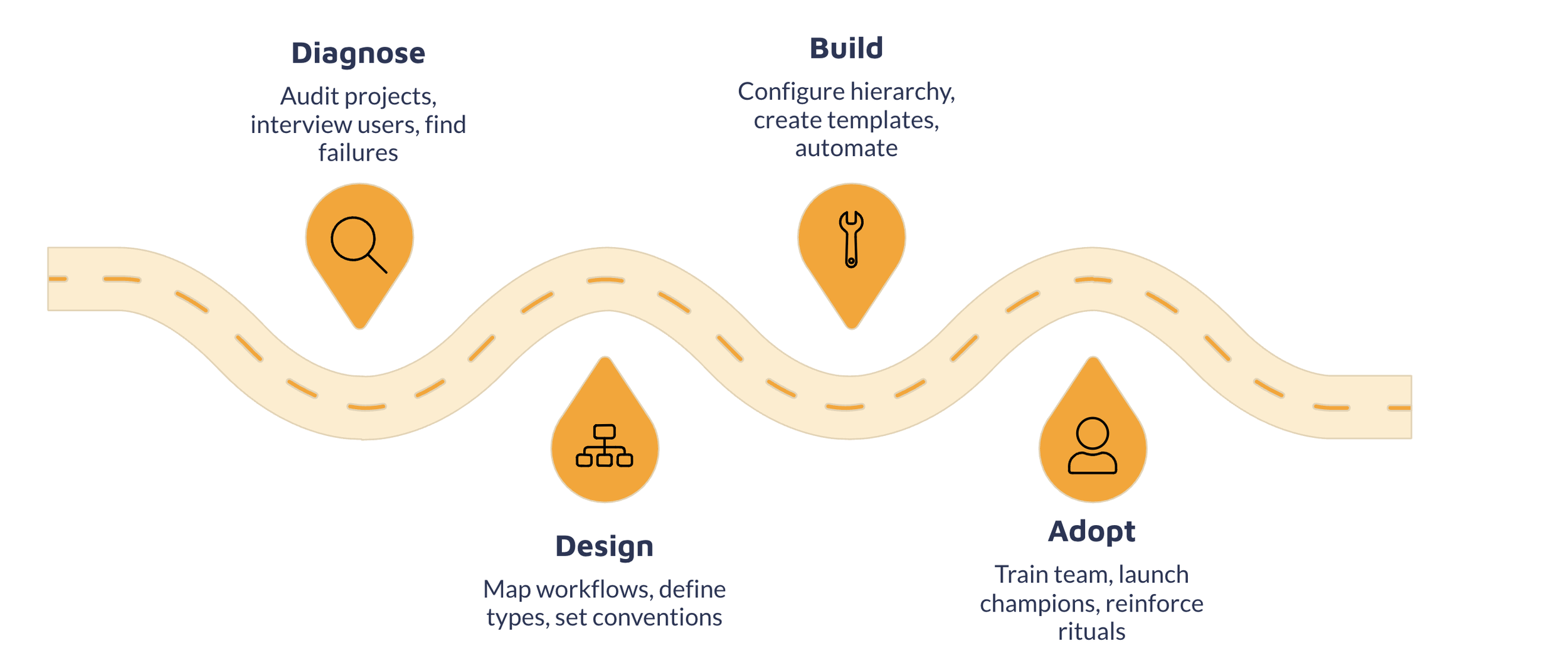
This is usually the approach that we employ with our implementations at Cirface. We map workflows out visually on Miro (flow diagram) to make translating them into Asana dramatically easier. Rather than designing a system from a blank slate, you're simply mirroring an existing process you've already defined into the tool.
Understanding Asana's Work Graph Structure
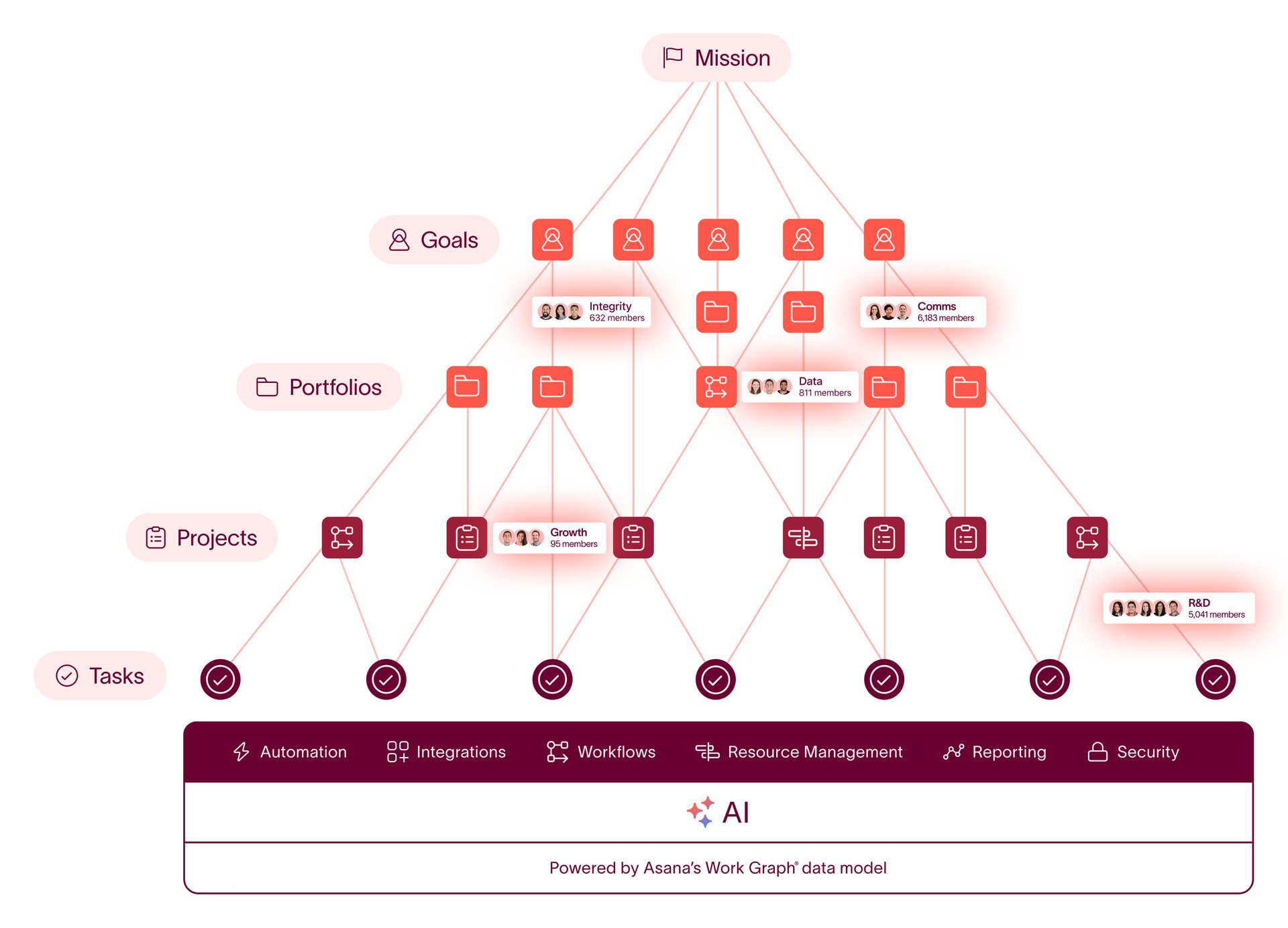
Even with a crisp workflow map, Asana implementations can quickly become convoluted if you don't grasp the tool's underlying information architecture.
In Asana, work is structured hierarchically:
Portfolios contain collections of projects and higher-level goals
Projects contain tasks and represent discrete initiatives
Tasks contain subtasks and represent units of work
Subtasks allow tasks to be broken down into smaller steps
Each object type has a specific relationship to the others. Structuring them intentionally helps your Asana setup scale gracefully as complexity grows.
For example, one anti-pattern I frequently encounter is teams using a single Asana task to track the entirety of a complex multi-week initiative, with dozens of subtasks and sub-subtasks nested underneath it. While you can configure Asana this way, it quickly becomes unwieldy to manage and navigate.
A more natural modeling based on Asana's hierarchy would be:
Portfolio: Marketing Campaigns
Project: Q1 Product Launch
Task: Publish blog post
Subtask: Draft post outline
Subtask: Write post content
Subtask: Add images and format
Subtask: Publish and distribute
Here the product launch is represented by a project, with each workstream as tasks, and more granular steps as subtasks. This maps elegantly to Asana's structure.
Anchoring your Asana design around the Work Graph model aligns the system to how the tool is architected, making it more intuitive and easier to scale.
Defining Standardized Asana Project Types
Another frequent failure mode I see in many teams go through is the unchecked multiplication of Asana projects. Without clear guardrails on why a new project should be created and what pattern it should follow, your Asana's side menu can quickly bloat with dozens of ad-hoc projects all structured differently.
While Asana technically allows unlimited projects, having a large volume without a unifying taxonomy creates disorder and confusion.
Before hitting the tempting "New Project" button again, I recommend codifying the types of projects that exist in your world. Most teams have a blend of a few common flavors:
Ongoing processes - Intake queues, bug triage, weekly sprints, editorial calendars. Recurring efforts with a stable workflow.
Timebound projects - Product launches, marketing campaigns, customer onboardings. Projects with a clear start, end, and outcome.
Resources & References - Team wiki, brand assets, SOP documentation. Repositories of information vs. tracking work.
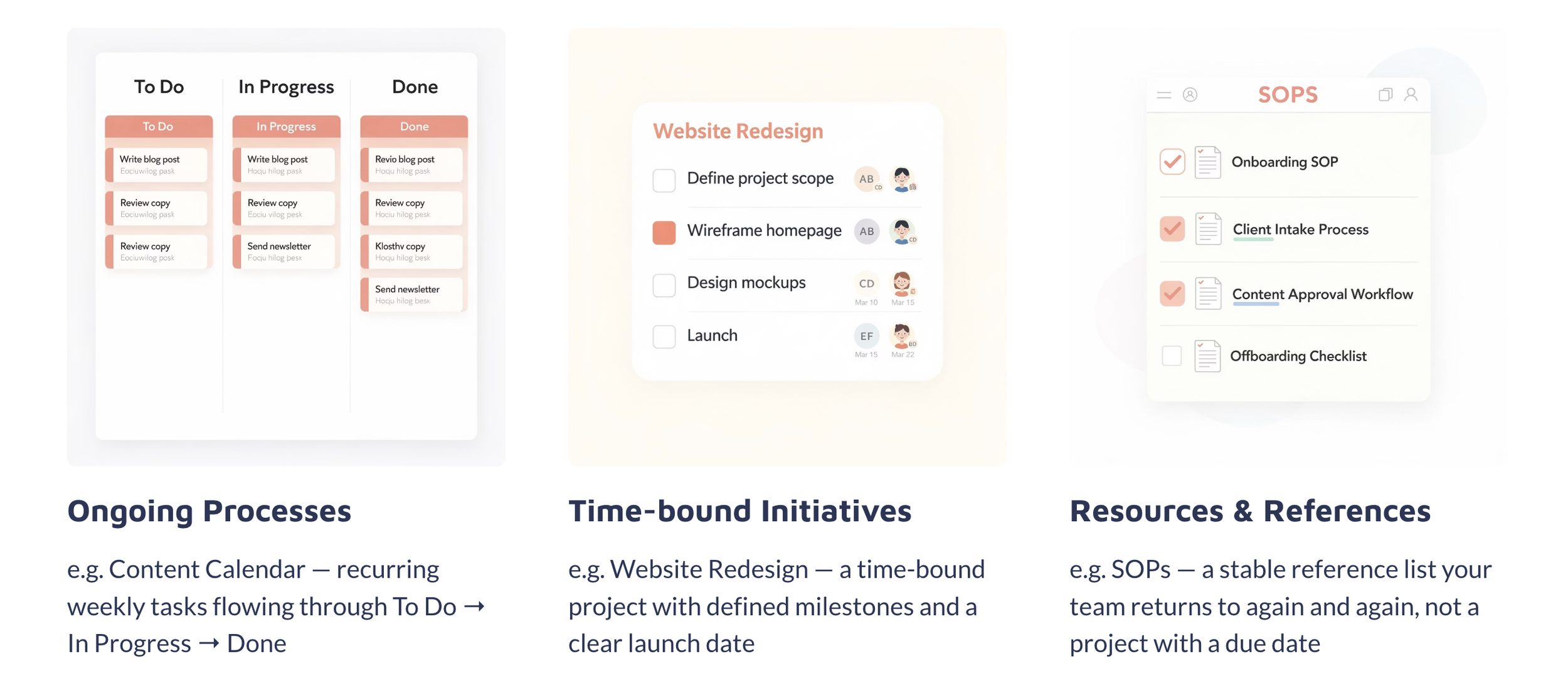
For instance, a customer success team might have:
Support Escalations Project (ongoing) - Triage and resolve customer issues
Onboarding Project Template (timebound) - Ramp up new accounts
Customer Playbook (reference) - Call scripts, email templates, FAQs
Defining a limited set of project types, each with a clear purpose and structure, prevents one-off projects from spiraling out of control and fragmenting your system.
Fixing Asana Adoption Breakdowns
Even the most elegantly designed Asana setup will fail if the team doesn't embrace it consistently. Spotty adoption is the most pervasive culprit behind Asana mediocrity.
Common drivers of underutilization include:
Lack of clarity on the purpose and value of Asana
Inadequate hands-on training on features and workflows
No clear internal ownership or points of contact for support
Abrupt cutover from old tools and processes
To turn around adoption challenges, focus on:
Crisply articulating the goals and benefits of Asana
Providing interactive onboarding and refresher trainings
Identifying internal champions to model best practices
Documenting conventions and providing ongoing support
Migrating iteratively with clear milestones and accountability

Do You Need to Overhaul Everything At Once?

After reading about all the potential pitfalls and optimizations, it may feel like your Asana needs to be razed and rebuilt from the studs. I promise you, that's rarely necessary, so don’t worry.
Start with incremental targeted improvements:
Connect disjointed projects into cohesive workflows
Clarify task and project sections to represent process phases
Populate missing task fields like due dates and assignees
Set up key automations and integrations
Archive obsolete and completed projects
Schedule refresher trainings and open office hours
Small tweaks can yield major dividends in efficiency and clarity. Focus on progressive enhancement vs. starting from scratch. Download our Asana Health Checklist to Audit your workflows!
So Is Asana Really the Problem?
From what I’ve seen working with over 100+ teams, Asana is more often NOT the problem. An Asana setup that feels unwieldy and frustrating to use is more often a reflection of: a) Ill-defined underlying processes b) Misalignment between collaborators on ways of working c) Underinvestment in focused training and adoption
The good news is all of these are solvable. When you take a step back to map out and align on how your work should flow through Asana, dialing in the setup to mirror those flows, and deliberately managing the human side of the rollout, even the most dysfunctional Asana setups can be redeemed.
The real question isn't whether Asana is the right tool (though certainly in some cases a different platform may be better suited). Rather it's whether your team has put in the upfront design thinking and adoption planning to set Asana up for success.
When those foundational pieces are in place, Asana can be a transformative central nervous system for efficient, transparent, and collaborative work. But it won't happen magically.
Building an Asana that meaningfully accelerates your operation requires real work and intentionality. This guide outlines the common traps to avoid and the core steps to take to realize that potential.
And if you find yourself stuck in a dysfunctional Asana and need expert help untangling it, drop us a line. We specialize in exactly this type of workflow design and optimization at Cirface.
Frequently Asked Questions
How do I know if my team's Asana issues are caused by the platform vs. our processes?
The clearest diagnostic is what would happen if you moved all your work to a different platform tomorrow. Would the new tool immediately feel simple and frictionless? Or would you just be dealing with the same confusion in a different interface? If it's the latter, the problem likely lies in your underlying processes, not the tool itself.
I'm a new manager inheriting a messy Asana. How should I start cleaning it up?
First, resist the urge to start fresh and rebuild from scratch. Instead, audit what you have:
Catalog all existing projects and their purposes
Note which ones are most active/obsolete
Interview users on what's working well vs. causing friction
Identify dangling/miscategorized tasks and projects
Then prioritize cleanup based on impact:
Archive unused/completed projects to reduce clutter
Clarify task status options and train the team on them
Connect dependent tasks and projects
Set up key automations and integrations
Should I have one Asana project per client/account/product or one master project?
It depends on your business model and how contained each client engagement is. A good rule of thumb:
If client work happens on a defined cadence (weekly, monthly, quarterly), a single Asana project per client works well to coordinate all recurring deliverables.
If client engagements are complex multi-phase projects, a single Asana project per initiative (with the client name as a field on tasks) provides more flexibility.
The key is to structure Asana projects around your primary unit of work delivery. Mirroring how you operationally organize work (vs. defaulting to org chart) leads to more intuitive setups.
How do I get my team to use Asana consistently?
Start with the why. Paint a vivid picture of how work will feel easier, more organized, and less stressful when Asana is used optimally. Anchor on the collective benefits vs. management edict.
Make it the easiest option. Integrate Asana into your existing tools (Slack, email, docs) so it's always one click away. Use automation to reduce manual entry.
Model the right behaviors. Narrate your own work in Asana - post key decisions, share progress, celebrate wins. Demonstrate how to communicate in tasks vs. side channels.
Make it safe to learn. Host regular training and Q&A sessions. Record videos of common workflows. Make it clear there are no "dumb questions".
Reinforce with rhythms. Use Asana to run meetings. Do project kickoffs and retros in Asana. Put recurring reminders to update tasks. Weave it into existing rituals.
Adoption is more about psychology than technology. Make Asana integral to your team's identity and habits vs. a chore they're forced to do.
How should I roll out an optimized Asana setup without disrupting work?
Progressively vs. all at once. Start with a single project or team. Pilot your optimized conventions, gather feedback, and iterate. Then roll out to adjacent teams.
Use completed work to demonstrate the benefits of the new setup. Celebrate and recognize people who model the right behaviors.
Attempting a wall-to-wall overhaul will likely be too disruptive and create resistance. Incremental waves of change give people time to adapt and see the value firsthand.
Conclusion
Asana is a deep and flexible tool. Wielded with intentionality and discipline, it can fundamentally streamline how work flows through an organization.
But that doesn't happen without focused and proactive effort. Following the principles and steps outlined in this guide can help you progressively disentangle and optimize even the gnarliest Asana setups.
And if you find yourself in an Asana quagmire you can't escape, we're always happy to lend a hand. Efficiently structuring Asana to enable more calm, productive, and impactful work is kinda our jam.