Which Online Proofing Software Works Best with Asana? (PageProof Review)
Online proofing software like PageProof transforms creative approval chaos into automated workflows when integrated with Asana. As Marketing lead at Cirface, I got tired of chasing feedback across Slack, email, and Asana comments (you name it!)….so I tested PageProof to see if it actually lived up to the hype. Turns out, it does. We've cut 2-4 hours of weekly admin work, centralized all our feedback in one place, and finally solved our version control nightmares. After seeing what it did for our internal team, we started recommending it to our customers and their creative teams. Here's what we learned.
📋 Table of Contents
Jump to any section to learn about online proofing software for Asana workflows
What Is Online Proofing Software and Why Asana Needs It?
Online proofing software centralizes design review, feedback, and approval in one place. While Asana tracks what needs to happen and when, design proofing software tracks how creative work gets reviewed and approved.
But there’s a disconnect. Asana is brilliant for task management but wasn't built for visual feedback, version comparison, or sequential approvals. Without integration, you're the human API manually copying feedback from PageProof (or email, or Slack) into Asana tasks.
With integration, Asana becomes your command center. When feedback comes in through PageProof, your Asana task status updates automatically. When all stakeholders approve, the task moves to "Approved" without anyone touching it. The final approved file attaches itself to the Asana deliverable.
When Asana's Native Proofing Falls Short
Asana's built-in proofing works fine for lightweight feedback, typically for quick input from one or two people on simple assets. But for multi-stakeholder approvals, version control across multiple rounds, or legal sign-offs… you'll hit its ceiling fast.
What native Asana proofing doesn't support:
Sequential approval workflows: You can't route proofs through Creative Director → Brand Manager → Legal → VP sign-off. Everyone reviews simultaneously, wasting time on feedback that upstream reviewers would have caught (a thing of nightmares for creative ops.)
Pixel-perfect version comparison: When you upload version 7, stakeholders can't see exactly what changed from version 6. PageProof's smart compare shows changes on a pixel level, highlighting every modification automatically.
Technical file validation: Print work, packaging, or production files need color profile, embedded font, and bleed validation. Asana can't verify if your PDF is missing a color profile or using wrong fonts.
External reviewer access without licenses: Your agency partners, freelance designers, and client stakeholders don't have Asana licenses. With creative proofing software, external reviewers get email notifications and can leave feedback without needing a login or even a license.
If you're managing creative approvals with native Asana tools and wondering why everything feels like manual overhead… you've outgrown the tool's proofing capabilities. And this, undoubtedly, incurs a cost.
How Much Is Approval Chaos Actually Costing You?
Running creative approvals without an online proofing software isn't free, because the costs hide in places you're not tracking: wasted hours, preventable errors, and team burnout.
The Weekly Time Drain
Let’s do the math.
45 minutes per week chasing people to review work. "Can you review this?" via Slack. No response. Follow-up email two days later. Still nothing. Finally, a direct message: "We're blocked and we need your approval!!!"
1.5 hours per week consolidating feedback from Slack, email, and meetings. Brand manager comments in email. Creative director marks up a PDF in Slack. Someone gives verbal feedback in stand-ups. You spend Tuesday morning creating a single feedback document because designers can't work from five different sources.
2 hours per week creating status reports. Your VP wants to know what's blocked, what's in review, what's approved. That information lives across email threads, spreadsheets, and Slack. You manually compile Monday morning update decks.
The math: For a team of 5 creatives + 3 stakeholders, that's 12-15 hours per week = 624-780 hours per year spent purely on process overhead. At $75/hour (conservative for mid-level ops roles), you're spending $46,800-$58,500 annually just managing approvals manually.

Before integrating PageProof with Asana, I spent Friday afternoons sending 'gentle reminder' messages across Slack, email, and Asana comments. Now the system does that work for me and stakeholders actually respond faster because the reminders come from the tool, not from me nagging them.
The Errors That Slip Through
Without structured creative proofing software, three error types become inevitable:
Wrong versions go live. Someone approved version 7 via email while the designer worked on version 9. The wrong file goes to print because no one had a single source of truth.
Feedback gets missed. Buried in an email thread with 47 replies or lost in a Slack channel. The designer moves forward, only to hear in the final review that these notes were flagged two weeks ago.
Compliance issues slip through. Worse of all, there’s no audit trail of who approved what and when. Legal thought Brand approved the disclaimer, brand assumed Legal signed off and neither actually did.
Why Your Team Feels Burnt Out
Burnout in creative ops isn't really a workload volume issue. It’s really a workload friction problem. When every approval requires six manual steps (upload file, notify stakeholders, chase non-responders, consolidate feedback, update Asana status, re-notify for next round), people feel like they're pushing a boulder uphill.
Remove the friction with automated reminders, integrated status updates, and centralized feedback, and the same workload feels manageable.
Why Does the Asana + PageProof Integration Change Everything?
Integrating an online proofing software like PageProof with Asana is the difference between "less chaotic" and "actually automated."
Without integration, you're still the human API by copying status updates from PageProof into Asana, manually attaching approved files, chasing people across two systems instead of five.
With integration, the systems talk to each other. Your job shifts from data entry to strategy.
We've tested dozens of workflow combinations at Cirface. What makes PageProof and Asana work is that neither tool tries to do everything. Asana tracks the work and PageProof manages the creative review. The integration connects them so we're not manually syncing status updates between systems, and that automation alone saves our team 2 to 4 hours per week.
What Makes This Integration Better Than Standalone Tools
Without integration, you're the human API:
Manually updating Asana every time someone leaves feedback in PageProof
Jumping between tools to see project status vs. approval details
Remembering to attach final files at 4:30 PM on Friday
With integration, the systems sync themselves:
Asana becomes your command center and everyone sees project status without logging into PageProof
Status changes trigger Asana automations (move tasks, notify teams, update fields)
Audit trail built into Asana task history for compliance questions
If your proofing tool isn't integrated with Asana, you're still doing manual admin work. You've just moved it to a prettier interface.
Creative Tool Integrations
One of PageProof's strengths is that designers don't leave their creative tools to see feedback and apply changes.
Adobe Plugins: Designers pull PageProof comments directly into InDesign, Photoshop, Illustrator, Premiere Pro, After Effects and Adobe Express. There's automated text and image replacement in InDesign. Instead of copy-paste, designers click a button and changes apply automatically.
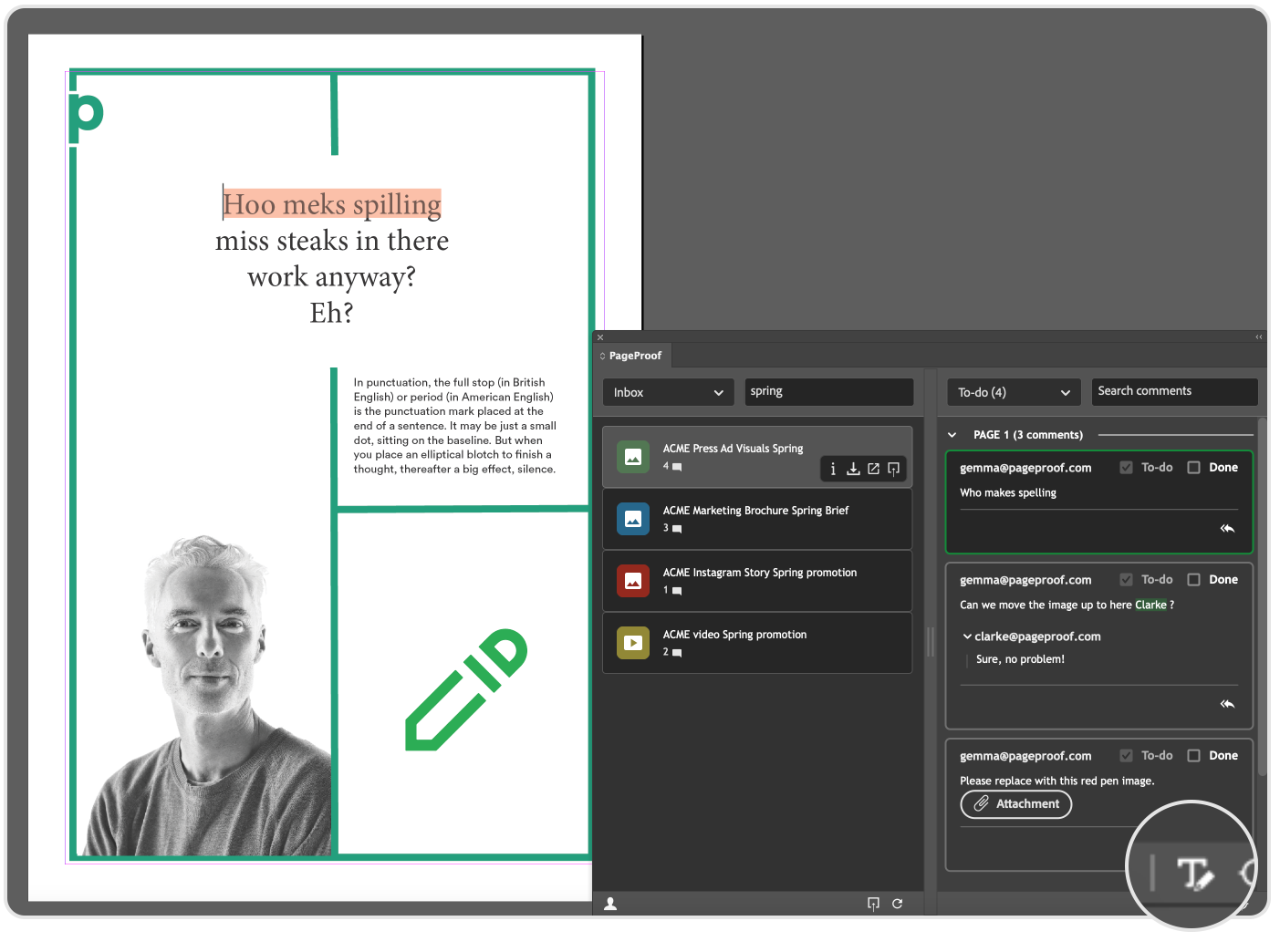
PageProof plugin in Adobe’s InDesign
Figma, Canva, Microsoft Office, Final Cut Pro Plugins: Same workflow for web and digital designers. Send proofs from any of these tools, get feedback in PageProof, bring feedback back into the creative tools.
Working with hundreds of creative teams, we quickly realized that designers hate context-switching. If they have to leave InDesign, open a browser, log into PageProof, read a comment, copy it, switch back to InDesign, find the text box, paste the change, then repeat for the next comment…that's 8 minutes per round of changes. Multiply across 20 assets per week = 2.6 hours per week per designer just switching contexts.
The ability to apply changes without leaving the creative tool removes that friction entirely.
Who Actually Needs Online Proofing Software?
Not every creative team needs dedicated design proofing software. Let's be honest about who this is for and who can stick with native Asana proofing.
You Need Proofing Software If...
1. You run multi-stakeholder approvals
If more than three people need to review creative work, and they need to do it in sequence (not all at once), you need structured workflows. PageProof supports linear workflows.
2. You're managing external reviewers
You can't give everyone an Asana license and you shouldn't have to. Online proofing software lets external stakeholders review work without needing access to your full project management system.
3. Version control is currently a nightmare
If your team keeps asking which version did Legal or Marketing approve… you NEED this. Version comparison features show exactly what changed between versions with pixel-level precision.
4. You're running video, print, or packaging workflows
These formats require technical validation: color profiles, embedded fonts, bleed, resolution. Native Asana proofing doesn't support any of that. PageProof's measurement widget shows colour profiles, print job details, and linked file names.
5. You need audit trails for compliance
Regulated industries like finance, pharma, and legal need timestamped proof of who approved what and when. PageProof’s audit shows a time-stamped trail of what happened to a proof across its lifecycle and you can also get a full history of tasks in Asana.
Litmus test: If you spend more than 30 minutes per week manually updating Asana task statuses based on approval feedback from other tools, you need proofing software.
How to Choose the Right Proofing Software for Asana
Not all online proofing software is built the same. Here's what actually matters when you're building creative workflows in Asana:
Does it integrate natively? And not through Zapier workarounds, as in actual native integration that updates Asana automatically.
Can external reviewers participate without licenses? Your agency partners and clients shouldn't need Asana access to review creative work.
Does it support sequential approvals? Creative → Brand → Legal → Final sign-off, in that order, not all at once.
Can designers work inside their creative tools? InDesign, Figma, Canva, and Photoshop plugins mean feedback comes to them, not the other way around.
PageProof checks all these boxes, which is why we use it internally and build it into our Asana implementations for clients. At Cirface, we specialize in helping teams integrate Asana with tools like PageProof so the rollout actually sticks. Book a call to discuss how we can help your team.
What to Test During a Trial Period
Don't just click around the interface. Run a real project through the trial.
Week 1: Set up the integration. Connect to Asana. Create a test project. Try creating a proof from an Asana task. Does it actually work smoothly?
Week 2: Run a real approval workflow. Take an actual creative asset needing feedback from 3-5 people. Set up sequential approval. Does Asana update automatically?
Week 3: Test the designer experience. Have a designer install the InDesign or Figma plugins. Give them feedback to implement. Are they switching windows constantly, or can they stay in their creative tool?
Week 4: Measure time saved. Track how much time your ops lead spends updating Asana statuses, chasing approvals, and consolidating feedback. Compare to baseline. If you're not saving at least 5 hours per week, something's wrong.
Frequently Asked Questions
Q: How much does PageProof cost?
The advanced plans start at $3,999 per year for the Team Plus tier, which includes unlimited reviewers, proofs, and storage, with advanced collaboration features. The Enterprise plan takes it to another level with unlimited templates, co-branding, seamless security features, data residency, webhooks, and an SDK to satisfy any custom-built system integration requirements.
Q: Can external clients and agencies use proofing software like PageProof without paying for licenses?
Yes. External reviewers receive email notifications and can leave feedback without needing a login or paid license.
Q: Will PageProof integrate with our existing tools?
PageProof offers native integrations with Asana, Monday.com, Trello, Adobe Creative Cloud, Figma, Slack, and Microsoft Teams. Check each vendor's integration list during your trial to ensure compatibility with your specific tech stack.
Q: Is PageProof secure for regulated industries?
PageProof is fully encrypted and demonstrates a strong commitment to security by leveraging Microsoft Azure’s trusted infrastructure and holding a wide range of certifications including SOC 1, SOC 2, SOC 3, ISO/IEC 27001 and 27018, CSA STAR, FIPS 140-2, PCI DSS, as well as regional certifications such as CC Framework (New Zealand), G-Cloud (UK), TRUCS (China), MTCS (Singapore), CS (Germany), GDPR (EU), CCPA (US), and IRAP (Australia). It offers full audit trails and e-signatures required for finance, pharma, and legal compliance. Verify certification status during vendor evaluation.
Q: Can online proofing software handle video, print, and web design?
Yes. PageProof supports all file types including Adobe Creative Cloud, Microsoft Office, web banners, videos, and emails. Look for tools with measurement widgets showing colour profiles, bleed, and embedded fonts for print work, plus timeline commenting for video reviews.
Q: What if our team tried proofing software before and it didn't stick?
Adoption failure typically comes from lack of integration (tool lived in a silo separate from Asana) or no ownership (no one trained stakeholders or enforced the process for 4-6 weeks). Treat it as a process change, not just a software purchase. Integrate with existing workflows, assign an owner to drive adoption, and create saved workflow templates so ops managers don't rebuild approvals from scratch every time. At Cirface, we specialize in helping teams integrate Asana with tools like PageProof so the rollout actually sticks. Book a call to discuss how we can help your team.
Bottom Line: Is Online Proofing Software like PageProof Worth It?
If you're spending more than 30 minutes per week manually updating Asana tasks based on approval feedback scattered across email, Slack, and meetings then yes, online proofing software is worth it.
The teams that get this right cut 6-10 hours per week in administrative overhead. They eliminate version control disasters. They stop being the human API between systems. And they actually focus on strategy instead of chasing approvals.
We implemented PageProof internally first before recommending it to clients. That's our rule at Cirface. We only recommend tools we actually use. After seeing it cut our approval time by 40% and eliminate version control chaos, we made it part of our Asana implementation service. Now we help creative ops teams at global payments companies, major sports franchises, and distributed agencies build these same integrated workflows.
Author Disclosure
This post is based on real experience implementing creative workflow systems at Cirface, a digital strategy and operations consultancy. While we’re also a PageProof Platinum Partner, we've helped ops teams at global payments companies, major sports franchises, and distributed creative agencies build integrated approval workflows using Asana and proofing software.
We don’t earn affiliate commissions from links in this article, and we only recommend tools we've actually used and would implement for our own projects. All product comparisons are based on verified third-party reviews.